


Language Learning: Pingo AI
4.7972.00 Reviews
App Specs
- Version
- 5.4.4
- Updated On
- License
- Free
- Downloads
- 5,000,000+
- Developer
- Pingo AI, Inc.
- Categories
- Education
- Platform
- Android
Screenshots
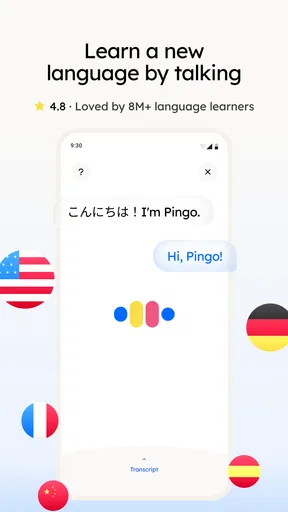
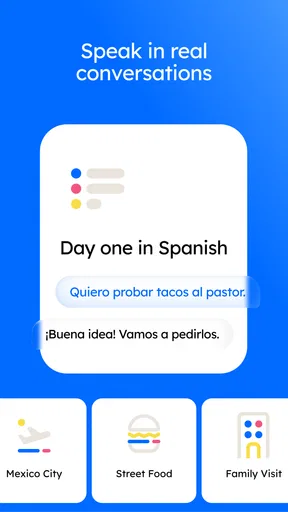
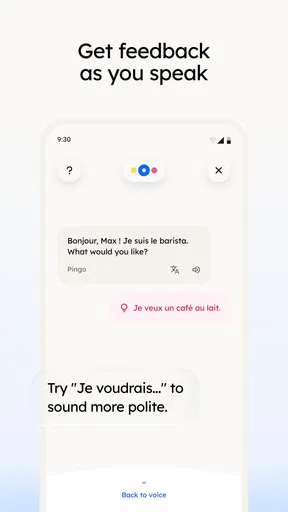
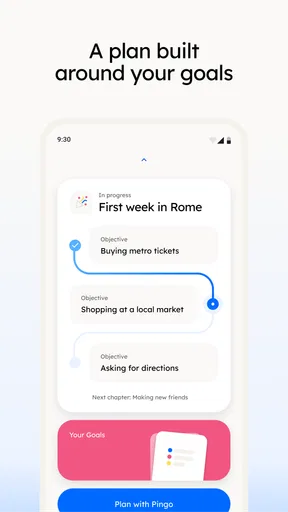
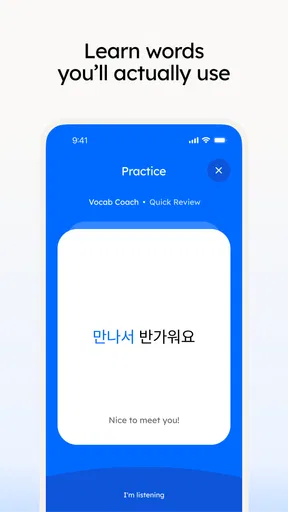
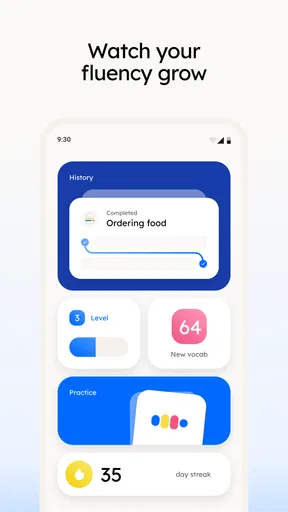
 Analysis by AppCompare
Before committing to a new study routine, I’d think about where and how you’ll use Pingo AI. It is an AI-powered language-learning app from Pingo AI, Inc., and its conversational, speech-focused approach makes it most appealing when you can give it your attention rather than squeeze it into every spare second. In my experience, having a phone-based tutor is convenient, but the quality of that convenience depends on your connection, your surroundings, and whether you’re ready to speak out loud.
When a connection matters
AI-led lessons and speech practice are the parts that make this app feel different from a stack of flashcards, and they are also the moments when a steady internet connection is most useful. I’d plan to start a lesson somewhere with reliable service, especially if I wanted to move between listening, speaking, and writing without interruption. A connection can matter even more when I’m trying to follow spoken prompts or get feedback quickly; a pause at the wrong moment can break my concentration.
That doesn’t mean every study session has to be long or formal. A short practice at home before leaving for work can be a sensible routine, while a noisy bus ride is better suited to quiet review than speaking exercises. If I’m unsure how well a session will work on the move, I’d try a brief lesson first rather than relying on it for a time-sensitive study plan.
Making phone practice fit real life
The app’s speaking exercises are useful when I have a little privacy: at home, in a quiet corner during a break, or while preparing for a conversation I expect to have later. I wouldn’t use them in a place where I’d feel awkward speaking into my phone. That is not a flaw in the learning idea, but it does make the experience less flexible than silent vocabulary practice.
A practical routine is to choose one small goal before opening the app. For example, I might practice introducing myself in Spanish, then repeat a phrase I stumbled over instead of trying to complete a long session while distracted. This keeps phone study focused and gives the speech feedback a clear purpose. It also makes it easier to notice whether I’m improving, rather than tapping through prompts just to keep a streak alive.
If a lesson gets interrupted
Mobile learning rarely happens in perfect conditions. Calls, weak reception, and background noise can all interrupt a session, so I’d avoid treating a single practice run as an important appointment. If a lesson stops making sense after an interruption, I’d return to a familiar exercise or restart with a smaller goal rather than trying to push through while distracted. A calm reset is more useful than turning a minor technical snag into a reason to abandon the routine.
I also like to separate an app hiccup from a learning problem. If speech recognition doesn’t seem to understand me, I’d first try speaking more slowly and clearly in a quieter place, then see whether the same phrase behaves differently. That is a practical way to check whether the difficulty is my pronunciation, the environment, or the connection, without assuming that every confusing result is a reliable assessment of my speaking ability.
Worth Reading Before You Choose

Flipboard Shows What News Apps Must Do Beyond the Feed

Switching to Android Auto Means Rethinking Your Driving Routine

Google Calendar Makes a Crowded Week Easier to Manage

Ludo King Makes the Most of the Minutes Between Plans

Baby Panda World Brings Quick Play to Modern Phones, but Its Game Library Feels Busy

ESPN’s Live Game View Makes Following Close Games Easier
Using mobile data thoughtfully
If I’m studying away from Wi-Fi, I’d keep sessions short until I know how the app behaves on my connection. AI interaction and audio can be more demanding than reading a word list, so it makes sense to save longer speaking practice for a place where service is dependable. I’d also check my device’s data use if I planned to make these sessions part of a daily commute, rather than assuming every kind of exercise has the same network needs.
Battery and privacy are practical considerations, too. Speaking aloud and listening to prompts are less discreet than reading, and a phone that is already low on power may not be the best place to run a lengthy lesson. I’d use headphones where appropriate, keep the volume considerate in shared spaces, and choose a quiet setting when I want to judge pronunciation accurately. Those small choices can make practice more comfortable without turning it into a complicated setup.
Getting Started with Pingo AI
First things first, setting up Pingo AI is a breeze. The app welcomes you with a friendly and intuitive interface that doesn’t require a PhD to navigate. You can choose from a wide array of languages, so whether you're into Spanish, French, or even something less mainstream like Korean or Swahili, they've got you covered.
Once you select your language, the app asks a few questions to tailor the learning experience to your level and goals. Are you a complete newbie or someone who just needs to brush up? Pingo AI adjusts its lessons accordingly, which is a pretty neat feature.
Interactive Learning Experience
Now, let’s talk about the actual learning process. This is where Pingo AI really shines. The app uses AI to create a highly personalized learning path. It feels a bit like having a private tutor who knows exactly what you need to work on. The lessons are engaging and interactive, with a mix of listening, speaking, and writing exercises.
One feature I absolutely love is the speech recognition technology. You can practice speaking and get immediate feedback on your pronunciation. It’s like having an honest friend who’s not afraid to tell you when you sound ridiculous, but without the embarrassment of doing it in front of a real person.
Keeping You Motivated
We all know that learning a language can be a bit of a grind sometimes, but Pingo AI does a fantastic job of keeping things interesting. The app gamifies the learning process with daily challenges, streaks, and rewards. It’s almost like playing a video game where you’re leveling up your language skills instead of your character.
Plus, the app sends friendly reminders to keep you on track. It’s easier to stick to your language learning goals when you have a little nudge every now and then.
Challenges and Opportunities
No app is perfect, right? There are a few areas where Pingo AI could improve. For instance, while the app covers a broad range of languages, the depth of content varies. Some less common languages might not have as extensive material as popular ones like Spanish or French. So, if you’re diving into a niche language, it might be worth checking the available content first.
Also, while the AI personalization is impressive, it can sometimes feel like it’s pushing you too fast or not fast enough. It might take a bit of tweaking in the settings to find that sweet spot for your learning pace.
Choosing the right role for the app
I see Pingo AI as a strong fit for learners who want to rehearse speaking without arranging a lesson with another person. It can help a beginner get comfortable forming short responses, and it gives an intermediate learner a low-pressure place to repeat phrases and notice pronunciation issues. It is less suitable as a complete replacement for conversation with native speakers, a teacher, or structured study materials: a practice app can build confidence, but real exchanges add interruptions, accents, context, and the need to respond naturally.
That distinction matters if your goal is a near-term exam, professional fluency, or precise feedback on grammar. I would pair the app with reading and listening from other sources, and with a human tutor when correction needs to be detailed or nuanced. If all you want is a quiet way to memorize vocabulary, a traditional flashcard app may be simpler and less dependent on speaking. If you want to start talking but feel self-conscious, Pingo AI’s private practice is a more comfortable first step.
A routine that makes the feedback useful
For a realistic everyday use, imagine I’m preparing for a weekend trip and want to order food in Spanish. I’d use a short session to rehearse a greeting, a simple request, and a follow-up question, then repeat any line that the speech tool struggles to recognize. Later, I’d write the phrases down or review them in context instead of assuming one successful repetition means I’ll remember them under pressure. The app is most helpful when I bring a specific situation to practice, not when I expect it to decide every learning priority for me.
One useful trade-off is to prioritize clarity over speed. If recognition feedback seems off, I’d repeat the same phrase slowly in a quiet place before changing my study level or concluding that I’ve learned it incorrectly. I’d also keep a small note of expressions that feel difficult, so the next session can focus on a real sticking point. That simple habit makes personalization easier to judge and stops a streak or reward from becoming the main goal.
What to expect before making it a habit
Pingo AI is free to install, with in-app purchases ranging from $14.99 to $99.99 per item, so I’d explore the available learning experience before deciding whether to spend. The app is rated for Everyone, has an average rating of 4.8 from around 89,000 ratings, and has passed one million installs. Those figures suggest it has attracted a substantial audience, but they don’t tell me whether its teaching style suits a particular learner; a few focused sessions are a better test than popularity alone.
The app was released on January 2, 2025, and its current version is 4.2.1, with Android 8.0 as the minimum OS. If I were considering it for an older phone, I’d check compatibility before building a routine around it. I’d also try both a quiet speaking session and a short session on the kind of connection I expect to use most. That helps answer the practical questions: whether the feedback feels helpful, whether I’m comfortable speaking in my usual study spot, and whether the app fits my data and attention limits.
Connectivity verdict
For me, the best way to use this language-learning app is as a connected practice companion, not as a tool I depend on in every setting. A stable connection and a reasonably quiet place make its AI and pronunciation exercises easier to use; interruptions, noise, or limited mobile data can make a shorter session—or a different study method—the smarter choice. I’d recommend it to someone who wants approachable speaking practice and can make room for it in their day, while learners who need offline-first study, extensive human correction, or a fully silent workflow may prefer another option.
Final Thoughts
All in all, Pingo AI is a fantastic tool for anyone looking to learn a new language or improve their skills. It’s user-friendly, engaging, and makes learning feel less like a chore and more like an adventure. Whether you’re preparing for a trip abroad or just want to impress your friends with your multilingual prowess, this app is definitely worth a try.
So, if you’re ready to embark on your language learning journey, you might want to give Pingo AI a shot. Happy learning!
Pros
- Intuitive interface for easy navigation.
- Wide variety of languages available.
- Personalized learning paths.
- Interactive and engaging lessons.
- Offline mode for learning on the go.
Cons
- Limited free content access.
- Ads can be intrusive at times.
- Requires frequent updates.
- Occasional app crashes reported.
- Pronunciation tools need improvement.
FAQs for Language Learning: Pingo AI
What is Pingo AI and how does it work?
Pingo AI is a language learning app designed to facilitate learning through interactive lessons and AI-powered tools. The app uses artificial intelligence to tailor lessons to individual learning styles, providing personalized feedback and progress tracking. It offers a range of languages and utilizes gamification to make learning engaging and effective.
Is Pingo AI suitable for all language proficiency levels?
Yes, Pingo AI caters to all proficiency levels, from beginners to advanced learners. The app assesses your skill level through an initial quiz and adapts lessons accordingly. This ensures that users receive content that is neither too easy nor too challenging, optimizing the learning experience for everyone.
What features does Pingo AI offer to enhance language learning?
Pingo AI offers a variety of features, including interactive lessons, speech recognition for pronunciation practice, and real-time feedback. Additionally, the app includes gamified exercises, cultural notes, and vocabulary building tools. Users can also track their progress and set personalized learning goals to stay motivated.
Does Pingo AI require an internet connection to use?
While some features of Pingo AI, such as downloading lessons or accessing the community forums, require an internet connection, many of its core functionalities are available offline. This allows users to continue learning without interruption, even when traveling or in areas with limited connectivity.
Is there a cost associated with using Pingo AI?
Pingo AI offers both free and premium versions. The free version includes basic lessons and features, while the premium version provides access to advanced lessons, personalized coaching, and additional resources. Users can choose a subscription plan that best fits their learning needs and budget.


